.Leica ICC50 HD Microscope Camera
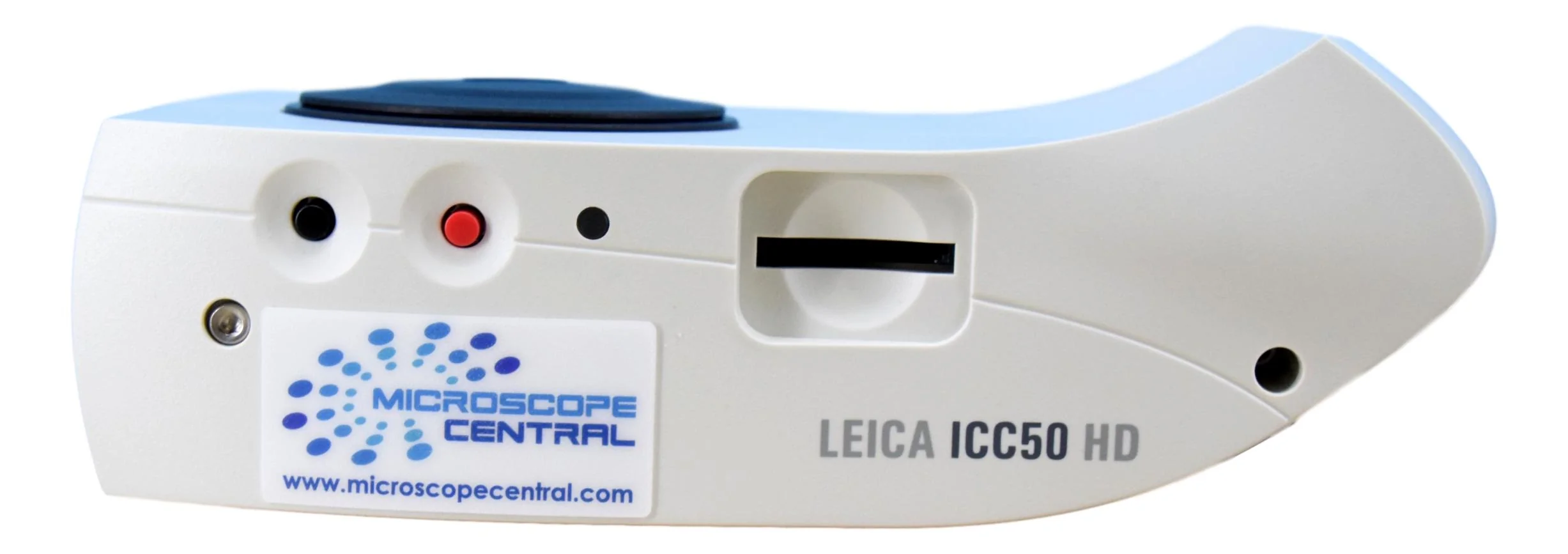
The Leica ICC50 HD microscope camera can turn any Leica DM series microscope into a digital microscope. It gets mounted between the head and body of the microscope so it does not require a trinocular head or c-mount adapter. This camera is also compatible with several Olympus models, such as the BX series microscopes. Due to its mounting position the camera produces higher quality images with a faster frame rate than traditional c-mount cameras since the image is closer to the camera sensor. This camera is a 3.0 M.P. camera, which is ideal for microscopy. It can output via HDMI cable to a monitor / projector and you can capture images / videos to a removable SD card. It can also output USB to a computer to use with the free Leica LAS EZ software which allows for image capture, video capture, annotations, measurements, etc.
This camera has been replaced with the Leica ICC50 W which has WiFi output features added. This listing is for a used camera that has been fully tested, firmware has been upgraded, it comes with power supply, cables, software, and a 3 month warranty.
| Specifications: | |
|---|---|
| Exposure time: | 2 msec – 2 sec |
| Live image: | 45 fps (1280 × 720 Px) – 20 fps (1920 × 1080 Px), depending on brightness level |
| Full frame image acquisition: | 2048 × 1536 pixels, 3.1 megapixels |
| Movie clip: | 720 × 480 pixels (MP4) |
| Color depth: | 24-bit |
| Data format: | JPEG / TIFF / BMP / MP4 |
| Operating systems: | Windows XP, Windows Vista, Windows 7, 8, 10 Macintosh OS X |
| Software: | Leica LAS EZ software (PC), optional Leica LAS modules, Leica Acquire (Macintosh) |
| Minimum Computer Configuration: | Intel Pentium 4 or DuoCore, 2GHz, 2 GB RAM, 24-bit graphics, 1248 × 1024, DVD drive |
| Minimum Display Specification: | 1920 × 1080 resolution, HDMI connection, DVI connection possible with HDMI/DVI adapter cable (not provided) Note that some displays require that you switch the camera live HD resolution to 1280 × 720 Px. |
| Mics. | Includes HDMI cable & Power Cable |
Brochure
 Leica ICC50 HD Brochure


Description
The Leica ICC50 HD microscope camera can turn any Leica DM series microscope into a digital microscope. It gets mounted between the head and body of the microscope so it does not require a trinocular head or c-mount adapter. This camera is also compatible with several Olympus models, such as the BX series microscopes. Due to its mounting position the camera produces higher quality images with a faster frame rate than traditional c-mount cameras since the image is closer to the camera sensor. This camera is a 3.0 M.P. camera, which is ideal for microscopy. It can output via HDMI cable to a monitor / projector and you can capture images / videos to a removable SD card. It can also output USB to a computer to use with the free Leica LAS EZ software which allows for image capture, video capture, annotations, measurements, etc.
This camera has been replaced with the Leica ICC50 W which has WiFi output features added. This listing is for a used camera that has been fully tested, firmware has been upgraded, it comes with power supply, cables, software, and a 3 month warranty.
| Specifications: | |
|---|---|
| Exposure time: | 2 msec – 2 sec |
| Live image: | 45 fps (1280 × 720 Px) – 20 fps (1920 × 1080 Px), depending on brightness level |
| Full frame image acquisition: | 2048 × 1536 pixels, 3.1 megapixels |
| Movie clip: | 720 × 480 pixels (MP4) |
| Color depth: | 24-bit |
| Data format: | JPEG / TIFF / BMP / MP4 |
| Operating systems: | Windows XP, Windows Vista, Windows 7, 8, 10 Macintosh OS X |
| Software: | Leica LAS EZ software (PC), optional Leica LAS modules, Leica Acquire (Macintosh) |
| Minimum Computer Configuration: | Intel Pentium 4 or DuoCore, 2GHz, 2 GB RAM, 24-bit graphics, 1248 × 1024, DVD drive |
| Minimum Display Specification: | 1920 × 1080 resolution, HDMI connection, DVI connection possible with HDMI/DVI adapter cable (not provided) Note that some displays require that you switch the camera live HD resolution to 1280 × 720 Px. |
| Mics. | Includes HDMI cable & Power Cable |